News:

Currently available MegaGlest gameservers are listed on Play.MG.

Main Menu
Menu

Show posts

This section allows you to view all posts made by this member. Note that you can only see posts made in areas you currently have access to.

Show posts Menu

Messages - 小丑遊戲

#1
MegaGlest / modify megaglest source code game
10 December 2023, 15:56:46
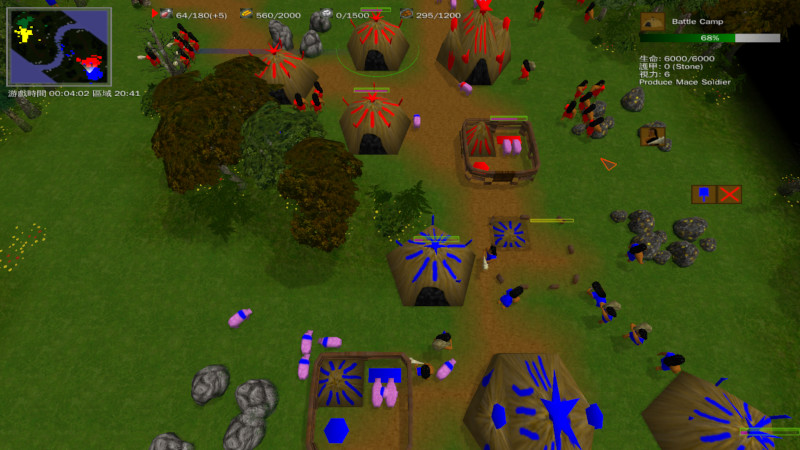
This is Game picture


and this is game download pack
https://www.dropbox.com/scl/fi/7eatapu737qcn7dfxaam6/megaglest-data.7z?rlkey=jwpvqq4dqcdvwofvperkk3jqo&dl=0

you can try to play

and this is test beta version!!!!!
#2
Mods / primitive war(原始戰爭)
8 January 2022, 15:03:22
這是之前我做的一個MOD:原始人faction的修改
https://forum.megaglest.org/index.php?topic=10117.0
目前還是只有一個陣營,就是Nomada陣營
但是比起之前,除了將之前的單位重新製作外
還多出了許多單位和建築,(目前還沒有科技研發的設計)
就如下圖所示:

translate:
This is a MOD I made before: modification of the original person faction
https://forum.megaglest.org/index.php?topic=10117.0
There is still only one camp at the moment, the Nomada camp.
But compared to before, in addition to remaking the previous units
There are also many more units and buildings, (there is no design for technology research and development yet)
As shown in the figure below:

這個之後還會再繼續更新,而且會陸續做出共三種陣營

translate:
This will continue to be updated after this, and a total of three camps will be made one after another.

Download:
https://drive.google.com/file/d/1J7hKmVgSf5IJ2MA_te_7MUrccc-Qvx1e/view?usp=sharing


#3
Can I ask questions?
It's about the Megaglest source code
I modified:
source>glest_game>global>metrics.cpp

void Metrics::reloadData(int resWidth, int resHeight) {

    minimapX= 128;
   minimapY= 10;
   minimapW= 128;
   minimapH= 128;

   displayX= 270;
   displayY= 10;
   displayW= 128;
   displayH= 482;   

source>glest_game>graphics>renderer.cpp

void Renderer::renderDisplay() {

      //   單位名字字串
      renderTextShadow3D(
         display->getTitle().c_str(),
         coreData.getDisplayFont3D(),
         display->getColor(),
         metrics.getDisplayX() + 40,
         metrics.getDisplayY() + metrics.getDisplayH() - 360);

      //   單位基本資訊文字字串
      renderTextShadow3D(
         display->getText().c_str(),
         coreData.getDisplayFont3D(),
         display->getColor(),
         metrics.getDisplayX() +128,
         metrics.getDisplayY() + metrics.getDisplayH() -360);

      //   單位指令資訊文字字串
      renderTextShadow3D(
         display->getInfoText().c_str(),
         coreData.getDisplayFont3D(),
         display->getColor(),
         metrics.getDisplayX()+512,
         metrics.getDisplayY() + Display::infoStringY);

      //   進度條
      if(display->getProgressBar() != -1) {
         renderProgressBar3D(
            display->getProgressBar(),
            metrics.getDisplayX(),
            metrics.getDisplayY() + metrics.getDisplayH()-50,
            coreData.getDisplayFontSmall3D(), 175);
      }
   }
   else {

      //   單位名字字串
      renderTextShadow3D(
         display->getTitle().c_str(),
         coreData.getDisplayFont3D(),
         display->getColor(),
         metrics.getDisplayX()+40,
         metrics.getDisplayY() + metrics.getDisplayH() - 360);

      //   單位基本資訊文字字串
      renderTextShadow3D(
         display->getText().c_str(),
         coreData.getDisplayFont3D(),
         display->getColor(),
         metrics.getDisplayX() +128,
         metrics.getDisplayY() + metrics.getDisplayH() -360);

      //   單位指令資訊文字字串
      renderTextShadow3D(
         display->getInfoText().c_str(),
         coreData.getDisplayFont3D(),
         display->getColor(),
         metrics.getDisplayX()+512,
         metrics.getDisplayY()+Display::infoStringY);

      //   進度條
      if(display->getProgressBar() != -1) {
         renderProgressBar3D(
            display->getProgressBar(),
            metrics.getDisplayX(),
            metrics.getDisplayY() + metrics.getDisplayH()-50,
            coreData.getDisplayFontSmall3D(), 175);
      }
   }

   //   單位圖標
   glEnable(GL_TEXTURE_2D);

   glColor3f(1.f, 1.f, 1.f);
   for(int i=0; i<Display::upCellCount; ++i){
      if(display->getUpImage(i)!=NULL){
         renderQuad(
            metrics.getDisplayX() + display->computeUpX(i),
            metrics.getDisplayY() + display->computeUpY(i)-360,
            display->getUpImageSize(), display->getUpImageSize(), display->getUpImage(i));
      }
   }

   //   單位指令圖標
   for(int i=0; i<Display::downCellCount; ++i){
      if(display->getDownImage(i)!=NULL){
         Vec3f c=display->getDownImageColor(i);
         glColor3f(c.x,c.y,c.z );

         //   dy = 10
         int x= metrics.getDisplayX()+display->computeDownX(i)+300;
         int y= metrics.getDisplayY()+display->computeDownY(i)-160;
         int size= Display::imageSize;

         //   向下選定位置
         if(display->getDownSelectedPos()==i){
            x-= 3;
            y-= 3;
            size+= 6;
         }

         renderQuad(x, y, size, size, display->getDownImage(i));
      }
   }

   //   單位指令圖標位置
   int downPos= display->getDownSelectedPos();
   if(downPos!=Display::invalidPos){
      const Texture2D *texture= display->getDownImage(downPos);
      if(texture!=NULL){
         int x= metrics.getDisplayX()+display->computeDownX(downPos)+303;
         int y= metrics.getDisplayY()+display->computeDownY(downPos)-163;
         int size= Display::imageSize+6;
         renderQuad(x, y, size, size, display->getDownImage(downPos));
      }
    }

The result is like the picture below
The location of the trigger option remains the same.
Which block of code should I start with?


#4
Feature requests / Re: Help with engine code
21 August 2021, 17:14:03
in fact,I have researched megaglest source code,too.
but i can not so understand.
#5
Feature requests / Re: Help with engine code
7 August 2021, 09:54:20
你可以拿megaglest的原始碼進行二次開發,
修改後可以進行商業化,
但是要遵守它的軟體許可証,
megaglest的軟體許可証是GPL2.0
必須要開源你修改的原始碼

You can take the source code of megaglest for secondary development,
It can be commercialized after modification,
But to comply with its software license,
Megaglest's software license is GPL2.0
You must open source the source code you modified
#6
MegaGlest / megaglest source code question?
7 August 2021, 09:43:49
問一個程序問題,那個遊戲中的小地圖,我想把它改到底部,要從minimap.cpp的哪個部分著手啊?
Ask a question about the program, the minimap in the game, I want to change it to the bottom, which part of minimap.cpp should I start with?

#7
Mods / Re: 原始人faction
16 June 2021, 17:55:17
現在已經修改好了,可以下載了
#8
Mods / 原始人faction
15 June 2021, 11:41:31
這個MOD直接上一張圖來


裡面的單位有
原始人
狼牙棒兵種
豬
主營帳
戰鬥營帳
牧場

引用以下非原創的音樂網址:
https://opengameart.org/content/crystal-cave-mysterious-ambience-seamless-loop

下載鏈結:
https://drive.google.com/file/d/1n5H7Jmhy13yYmPO5paZrDZQiq66TDMeK/view?usp=sharing

#9
Tools / Re: New Blender 2.9x G3D Exporter!
19 May 2021, 15:10:55


這問題要怎麼解決啊?
#10
格雷斯特(Glest Story)

前部曲 古老故事

第一章 奧爾克

第一節 外地人

[spoiler]    從前,在廣大的海平面上,有一個巨大的島嶼,在那座島上,有些人們在生活著,但是他們卻沒有生活上的知識,而過著非常原始的生活。在他們的身上,沒有衣物來遮蔽隱私的地方,也不會自行生火,他們一般都是在山洞中生活著。

  只要到了清晨時,他們就會全員的離開山洞,去尋找食物來吃。他們一般都是在山洞附近,來採集果實和植物果腹,除非在這附近當中,能夠食用的植物沒了,他們就會跑到較遠的地方,去尋著其他的食物來源。他們有時候會跑去鄰近的海域上,在海域的所在地,有著比較淺水的地方,時不時的會長出一些海草出來,他們就會在當地撿拾,然後當場食用。到了傍晚的時刻,他們就會空手的回到山洞中,在天色還沒全暗的時候,有時會聊起出去山洞採食所發生的事情,或者是說起和居住其他山洞的人們相遇時的種種事蹟,到了天色全暗的時刻,就會在洞內入眠,直到隔天清晨時,醒過來後,再出去山洞,找尋食物來吃,過著如此循環的日子。

  這些生活在山洞的人們,在我們之後的歷史上,都稱之為山洞族人。吃飽了就進山洞入眠,睡飽了就出去山洞找食物。雖然他們每天都過著如此的生活,但是山洞族人彼此之間的互動,都是十分和善,他們沒有什麼衝突在發生,而過著和平的日子。

  直到某一天,那些山洞族人一如往常的在外面尋找食物。在鄰近的海域上,他們看到了一個身上沒有半點遮蔽物,躺在沙灘上的年輕男子。他們試著用雙手去搖醒這位年輕的男子,但是他的意識還是沒清醒過來。

"接近他的時候,察覺到他還沒死。只是他躺在這昏迷不醒的,怎麼叫都叫不醒。"

  一個山洞族人很無奈的這麼的說著,他們不曉得這個男子是從哪裡來的,現在仍昏迷不醒的,一直躺在這個沙灘上。

"我們只好先把他放在這,目前還真是叫不醒他,可能過了一段時間,他就會自己醒來,然後去其他的地方,因該不會有生命危險的。"


"真的要放他在這嘛?要是把他放在這不管,海水不久就會上來,然後就把他給淹死的。"

  他們為了這個問題而爭論不斷,但是在眾人商量的結果下,結論就是要把這位昏迷不醒的年輕男子,抬到他們山洞的居住地,之後再觀察他的生存跡象。而後這群人就合力的,將這名男子扛起來,扛了一段路程,抬回他們定居的洞穴。但是過了不久,他們就離開山洞,出去尋找食物,留下他一人躺在山洞中。

  這個男子被抬進他們的洞穴後,隔了好一陣子,才逐漸的清醒過來。醒來時,發現自己身上沒有任何能遮敝的衣物。看了四周,也明白自己現在在山洞中,也不自覺的說起話來。

"這裡是哪裡,我怎麼現在在山洞中,我怎麼身上都沒穿著任何衣物,這是什麼情形。"

  此時的天色漸漸進入傍晚的情況。而那些山洞族人也回到他們居住的山洞,看見已經醒過來的年輕男子。
[/spoiler]
#11
Off topic / Glest Story(格雷斯特故事)
16 August 2020, 14:33:44
original

Quote寫這個故事啟發的由來
源自於看到這個開源遊戲
其開源的遊戲特性吸引了我
但是也有著的不足一面
就是沒有這遊戲所搭配的故事
更沒有遊戲的戰役
所以我就開始著手寫了這個故事的架構
讓這個遊戲能有更完整的世界觀
故事內容從第二頁開始看

注:
我來自台灣
所以我寫這篇故事的時
也只能用中文編寫
如果外國的網友真的想要了解故事裡面的內容
可能還要請你們用翻譯工具去理解
這點非常抱歉

Google translation

QuoteThe origin of writing this story
From seeing this open source game
Its open source game features attracted me
But it also has a disadvantage
There is no story with this game
Battle without games
So I started writing the structure of this story by hand
Let this game have a more complete world view
The content of the story starts from the second page

Note:
I come from taiwan
So when I write this story
Can only be written in Chinese
If foreign netizens really want to understand the content of the story
I may also ask you to use translation tools to understand
Sorry for that
#13
MegaGlest / Is there a latest update?
11 February 2019, 09:32:51
There is no latest version, it can be played in the windows10 system immediately after installation, and without any other installation and repair.
#14
Quote from: tomreyn on 10 February 2019, 17:40:37
Do other OpenGL games work fine? Which ones did you test?

So how can this be solved?
#15
Quote from: titi on 10 February 2019, 19:48:31
Is it external mouse (USB)? Is it a gaming mouse with a special driver ?

What about the touchpad ? Does the click work there ? ( try with and without mouse )

Which keyboard layout (country) is it ?


the touchpad does not work。
keyboard is chinese english。
#16
Quote from: tomreyn on 10 February 2019, 17:40:37
Do other OpenGL games work fine? Which ones did you test?

0.A.D game can play
#17
Quote from: tomreyn on 10 February 2019, 17:19:28
This video does not seem to show any errors.
Is the problem that you can not click on any of the main menu buttons?

YES,
I can not click on any of the main menu buttons!
This is a problem!
#18
https://www.youtube.com/watch?v=hMm6C3_Oof8

我用筆記型電腦玩的。
系統是windows10 1809版本
處理器是Intel(R) Core(TW) i5-6200U CPU @ 2.30GHz 2.40 GHz

I am playing with a laptop.
The system is windows10 1809 version
The processor is Intel(R) Core(TW) i5-6200U CPU @ 2.30GHz 2.40 GHz
#19
Quote from: andy_5995 on 16 January 2019, 14:28:17
You will need to try the "/" button, not the "\" button. Please try that and let us know if that changes the result.

sorry。

I made a mistake in this forum. I marked "/" as "\".
I have tried it, but it is still invalid.

In fact, when entering the game interface, there is a cut-off animation, when I click the mouse and press the keyboard
, did not directly skip that animation into the above game interface, must wait until the cutscenes are finished.
Is this question related to the problem that the mouse cannot move when entering the game interface?
#20
Quote from: andy_5995 on 16 January 2019, 14:11:55
The image you posted shows that you are trying version 3.5.2. You will need to try version 3.13.0 before submitting a bug report.

On the Downloads page you'll be able to find a  link to the 3.13.0 Windows version https://megaglest.org/download

The figure has been modified above, just playing version 3.13, the above problem is still not solved.

Also a problem, the notebook win10 can not play MG?
#21
Quote from: andy_5995 on 16 January 2019, 13:33:31
I do not understand your question.

Welcome to MG, 小丑遊戲. I hope you can get version 3.13.0 working. It has been tested on Windows 10 and should work ok for you.

As tomreyn indicated, the mouse cursor problem can often be solved by using the "/" key. If it's accidentally pressed on Windows, the mouse cursor will disappear.

But you said, "it does not move"? Can you tell us if pressing the "/" key has made any difference for you?

When I entered this game screen, I slide the mouse and the mouse on the screen will not move.

when you press the "/" button on the keyboard, it also Useless help .

#22
Would you like to ask more specific practices?
#23
Bug reports / MegaGlest 3.13.0 windows 10 BUG。
15 January 2019, 16:55:09
I used this version of Windows 10 to play this version. When entering the game screen, the mouse does not move. So you can't play it. Is there any way to solve it?

I am a Taiwanese player, because the latest version of MegaGlest can't play, so I am playing Glest's old game.

This is my live play channel:
https://www.youtube.com/channel/UCBRmtpP_OU3httBFYyyFfTw?view_as=subscriber